
GBP Verification Stuck — How to Escalate to Google If Your Verification Is Delayed
Been waiting for weeks, but your Google Business Profile (GBP) verification status still hasn't changed? You're not alone. Many Malaysian business owners face this exact situation — waiting with no feedback from Google, unsure whether their request is being processed or has gotten stuck in the system. This article will walk you through step by step how to identify the cause of the delay, how to fix it, and how to escalate to Google if all else fails.
What You'll Need
Before starting the escalation process, make sure you have the following on hand:
- The same Google account used when registering your GBP
- Access to Google Business Profile Manager at business.google.com
- Complete business information — name, address, phone number, category, and operating hours
- An active business phone number or email that can be reached
- Supporting documents (if required) — such as your SSM business licence, utility bills, or other documents proving your business address
Time required: 30–60 minutes Difficulty level: Easy (suitable for beginners)
Why Is GBP Verification So Important?
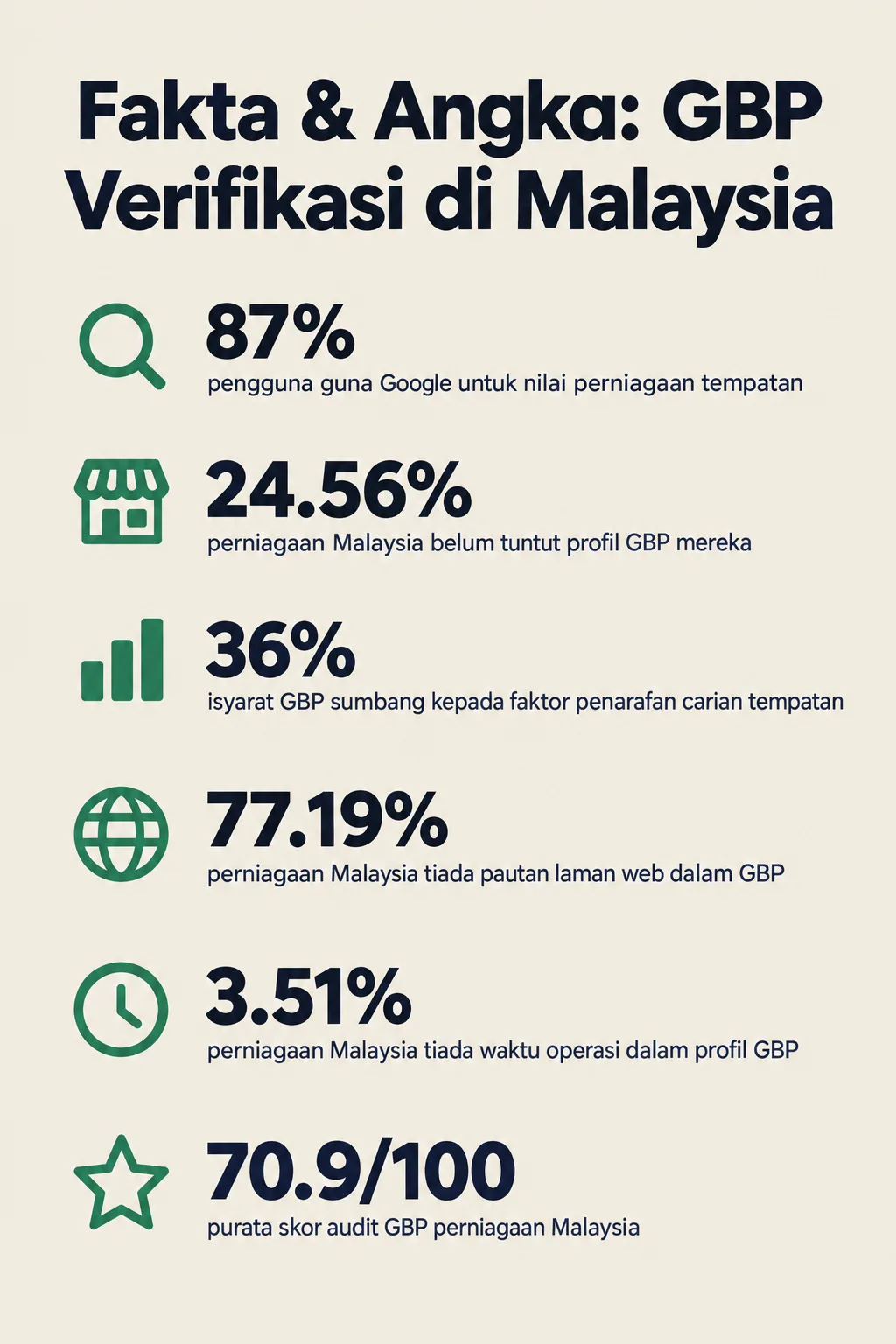
Before we get into the escalation steps, it's important to understand why this issue needs to be sorted out promptly. According to a BrightLocal study (2024), 87% of consumers use Google to evaluate local businesses before making a purchase decision. If your GBP hasn't been verified, your profile won't appear fully in Google Search and Google Maps — meaning potential customers simply can't find you.
What's more concerning, data from GBPAuditLab shows that 24.56% of businesses in Malaysia have yet to claim their GBP profile — and many of them may not even realise their verification process has gotten stuck. Moz (2023) also reported that GBP signals account for 36% of local search ranking factors — a figure too significant to ignore.
Step 1: Identify Why Your Verification Is Stuck
Check your profile's current status before taking any escalation action.
Log in to business.google.com and review your profile status. There are several common reasons why GBP verification can get stuck:
- Incomplete profile information — business name, address, or phone number not filled in correctly
- NAP (Name, Address, Phone) inconsistencies — information on your GBP differs from what's on your website or other directories
- Inaccurate business category — choosing a category that's too broad or not relevant
- Address cannot be verified — especially for businesses operating from home or using a P.O. box address
- Profile has been flagged for manual review by Google's system
Tip: GBPAuditLab data shows that 77.19% of Malaysian businesses have no website link in their GBP profile, and 3.51% have no operating hours. Incomplete information like this can automatically slow down the verification process.
Step 2: Complete and Correct Your Profile Information
Make sure all information in your GBP profile is complete and accurate before proceeding with the escalation process.
This is the most critical step, yet the most frequently overlooked. Google clearly states that "complete and accurate GBP information improves local search rankings". If your profile has incomplete information, your escalation request may be rejected or ignored.
Review and complete the following:
a) Business Name
Use your official business name — exactly as it appears on your SSM documents. Don't add extra keywords like "Best in KL" or "No. 1 in Malaysia" as this violates Google's guidelines and can get your profile suspended.
b) Business Address
Make sure your address format follows the standard Malaysian format. If you operate from home, you can still register a GBP as a Service Area Business without displaying your home address to the public.
c) Phone Number
Use an active Malaysian phone number. Avoid using a personal number if possible — use a dedicated business number instead.
d) Operating Hours
Fill in your operating hours accurately. GBPAuditLab data shows 3.51% of Malaysian businesses have no operating hours in their profile — the absence of this information can affect the verification process.
e) Business Category
Choose the most specific and relevant primary category for your business. For example, if you run a bread shop, select "Bakery" rather than just "Food Shop."
Step 3: Try an Alternative Verification Method
Re-select a suitable verification method if your original method failed or is taking too long.
Google offers several verification methods, and the availability of each depends on your business type:
a) Verification via Phone or SMS
If this option is available, it's the fastest method. Google will send a verification code to your registered phone number. Make sure your phone number is active and able to receive calls or SMS.
b) Verification via Email
Some businesses can be verified via a business email. Check your spam folder if you haven't received an email within 24 hours.
c) Verification via Postcard
This is the most common but slowest method — taking 5 to 14 working days. If your postcard hasn't arrived after 14 days, you can request a new postcard to be resent through Google Business Profile Manager.
d) Verification via Video
Google now offers video verification for certain businesses. You'll need to record a video showing your business's physical location, signage, business equipment, and surrounding environment as proof that your business genuinely exists at that address.
Step 4: Contact Google Support Directly
Escalate your issue to Google's support team if all verification methods have been tried but have still failed.
Here's how to contact Google support for GBP issues:
a) Via Google Business Profile Manager
- Log in to business.google.com
- Click on the support icon (?) or navigate to the "Help" section
- Type in your issue — for example "verification stuck" or "verification not completed"
- Select the option to speak with a support representative via live chat or email
b) Via the Google Business Profile Community
Visit support.google.com/business/community and describe your issue in detail. There are officially appointed Google Product Experts who can help resolve escalation issues.
c) Information to Include in Your Escalation Request
When contacting Google support, include the following information to speed up the process:
- Full business name as registered
- Complete business address
- Your GBP CID number (found in your profile URL)
- Verification methods attempted and the dates of each attempt
- Screenshots or proof that your business exists (if requested)
- Duration of wait — state how long you've been waiting
Step 5: Use Twitter/X for Faster Escalation
Reach out to Google via social media as an alternative if official support is taking too long.
Many business owners don't realise that contacting @GoogleMyBiz on Twitter/X sometimes gets a faster response compared to official support channels. Write a brief and professional public post, state your issue, and tag the official account. Avoid sharing sensitive personal information in public posts.
Step 6: Check Whether Your Profile Has Been Suspended or Deduplicated
Make sure there are no other technical issues causing the verification to fail.
Sometimes, verification gets stuck not because of a process problem, but because of:
- Duplicate listing — Google detects two profiles for the same business and puts both on hold until the issue is resolved. Read more about how to handle this in our article: Duplicate GBP Listing — How to Detect and Merge
- Profile has been suspended — this happens if Google suspects suspicious activity or misleading information
- Service area not set — for businesses without a physical location, the service area must be filled in correctly
You can also refer to our comprehensive guide: GBP Troubleshooting Malaysia — All Problems & Solutions for a full list of GBP issues and how to resolve them.
Step 7: Run a GBP Audit Before Re-Applying for Verification
Audit your profile thoroughly before re-applying for verification or submitting an escalation request.
This is the most important step to ensure your second application is successful. An incomplete profile or one with inconsistent information is the main cause of verification delays — and many business owners don't realise this until they carry out a thorough audit.
GBPAuditLab data from 57 audits over the past 90 days shows that the average audit score for Malaysian businesses is only 70.9/100 — meaning there's plenty of room for improvement before you re-apply for verification.
Run Your GBP Audit Now at GBPAuditLab
**GBPAuditLab.com** is a GBP audit tool designed specifically for Malaysian SMEs. Within minutes, you'll get a detailed report showing:
- Profile sections that are incomplete or inconsistent
- Issues that may be causing your verification to be delayed
- Specific, actionable improvement recommendations
- Your overall profile audit score
By identifying and fixing all these issues beforehand, you increase the chances of your verification being approved faster — without having to wait for weeks all over again.
👉 Audit your GBP for free at GBPAuditLab.com now
Related Issues You Should Know About
Besides stuck verification issues, there are several other GBP problems commonly experienced by Malaysian business owners:
- If your profile information keeps changing on its own without your permission, read: Why GBP Info Changes on Its Own and How to Stop It
- If your customer reviews have suddenly disappeared, read: Reviews Missing from GBP — Why It Happens and What You Can Do
- If your business isn't showing up in Google Maps, read: Why Your GBP Isn't Showing Up in Google Maps? (7 Reasons)
Summary
A stuck GBP verification is a problem that can be resolved — as long as you know the right steps to take. In short:
- Identify the cause — check your status and look for issues in your profile
- Complete your information — make sure NAP, category, and operating hours are accurate
- Try alternative verification methods — phone, email, video, or postcard
- Contact Google support — via Business Profile Manager or the official community
- Use Twitter/X if you need faster escalation
- Check for technical issues such as duplicate listings or suspensions
- Audit your profile at GBPAuditLab before re-applying
Don't let technical issues stop your business from being found by potential customers on Google. Take action now, audit your profile, and resolve this issue once and for all.