Hidden GBP Features 2025 — Updates Most Malaysian Businesses Missed
Google Business Profile (GBP) is more than just a listing with your business name and phone number. Over the past few years, Google has quietly added a whole range of new features into the GBP dashboard — with no big announcements, no notifications to business owners. Many Malaysian business owners carry on using their profiles as usual, unaware that these features have long been available and can significantly boost their visibility in local search results.
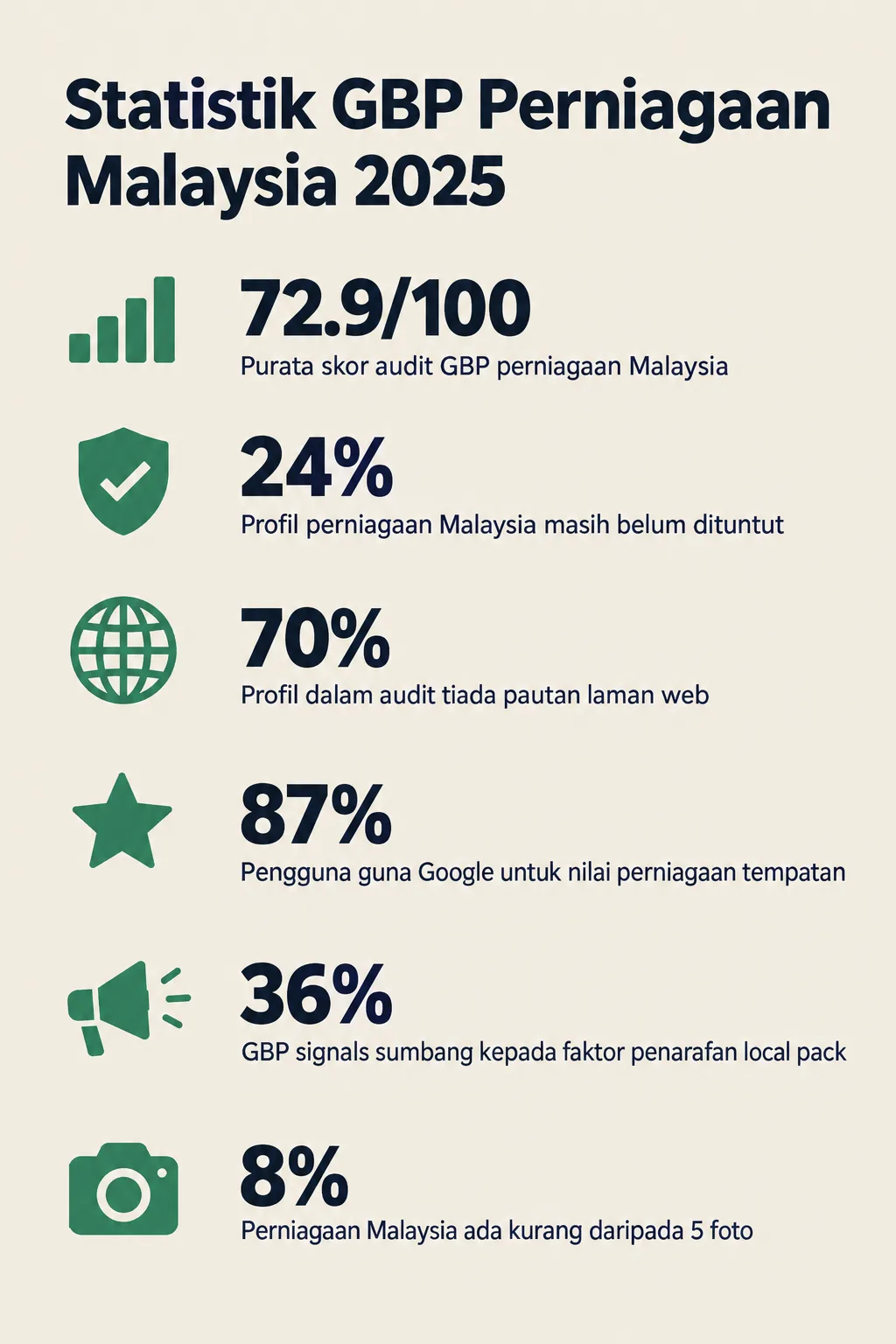
Based on data from 50 audits conducted through GBPAuditLab over the past 90 days, the average GBP profile audit score for Malaysian businesses is just 72.9/100. This means there is plenty of room for improvement — and most of that gap is not due to major mistakes, but rather features that have not been fully utilised. This guide will walk you through step by step to identify and activate the latest GBP features that are often overlooked.
What You Need
Before getting started, make sure you have the following:
- A Google account linked to your business GBP profile
- Full access to your Google Business Profile (as the profile owner or manager)
- A claimed business — GBPAuditLab data shows that 24% of Malaysian business profiles are still unclaimed, so the first step is to claim your profile at business.google.com
- Roughly 45–60 minutes to review and update all the features mentioned in this guide
Time Required and Difficulty Level
- Time: 45–60 minutes (for the first time); 10–15 minutes for periodic updates
- Difficulty Level: Easy — suitable for business owners who are just starting out with GBP
- Recommended Frequency: Revisit these features at least once every three months
Step 1: Activate and Complete the "Products" Section
Add your product catalogue directly into your GBP profile.
Many Malaysian business owners do not realise they can showcase a list of products or services right within their GBP profile. This feature lets potential customers see what you are selling — complete with photos, prices, and descriptions — without needing to click through to your website.
How to do it:
- Log in to business.google.com and select your business profile.
- Click on the "Edit Profile" menu and look for the "Products" tab.
- Click "Add Product" and fill in the product name, category, price (if applicable), a short description, and a product photo.
- Repeat this step for all your main products or services.
Why this matters: Customers searching for a specific product on Google can see your products directly in the GBP panel, increasing the chances they will contact you or visit your outlet. Bear in mind that 70% of profiles in GBPAuditLab audits have no website link — which means a product catalogue within GBP is an incredibly valuable shortcut to showcase your offerings to customers.
Step 2: Use the "Q&A" Feature to Answer Common Questions
Proactively explore and manage the Q&A section in your profile.
The Q&A section in GBP allows anyone — including members of the public — to ask questions about your business, and anyone can answer them. Here is the issue: if you are not monitoring this section, inaccurate answers may get posted and end up confusing potential customers.
How to do it:
- In your GBP profile, click the "Q&A" tab, or search for your profile on Google Search and scroll down to the "Questions & Answers" section.
- Answer all unanswered questions with accurate and professional information.
- Even better — add your own questions (log in as the business owner) and answer common ones such as: "Do you accept cash payments?", "What are your operating hours during public holidays?", or "Do you provide delivery?"
- Enable Google notifications so you are alerted whenever a new question comes in.
Why this matters: According to BrightLocal (2024), 87% of users rely on Google to evaluate local businesses. Well-answered questions build trust and lower the barrier for customers to reach out to you.
Step 3: Make Use of the "Bookings" and "Appointments" Feature (Where Applicable)
Integrate a booking system directly into your GBP profile.
If your business requires appointments or reservations — such as clinics, salons, car workshops, or consulting services — GBP now lets you link a booking system directly to your profile. Customers can make appointments without needing to call you.
How to do it:
- In the GBP dashboard, click "Edit Profile" and look for the "Booking" section.
- If you are using a booking platform supported by Google (such as Fresha, SimplyBook.me, or other platforms), connect your account.
- If you are not yet using any platform, consider signing up with one of Google's recommended providers.
- Once connected, a "Book" button will appear on your GBP profile.
Why this matters: Simplifying the booking process directly increases your conversion rate because customers do not need to leave Google to make an appointment. This is a significant advantage over competitors who still rely solely on phone calls.
Step 4: Optimise the "Services" Feature with Detailed Information
Build a comprehensive service listing with clear descriptions.
Unlike the "Products" section, the "Services" tab is designed specifically for service-based businesses. This feature lets you list each service with a detailed description and estimated pricing.
How to do it:
- In "Edit Profile", click the "Services" tab.
- Google may have already suggested some services based on your business category. Review these suggestions and accept the ones that are relevant.
- Click "Add Custom Service" to add services that are not in the suggested list.
- For each service, fill in the name, a short description (up to 300 words), and pricing where appropriate.
- Organise your services by category to make it easier for customers to read through.
Why this matters: Google uses the information in the Services section to match your business against more specific search queries. The more detailed your information, the greater the chance your profile will appear in relevant searches. According to Google (2024), complete and accurate GBP information directly improves rankings in local search.
Step 5: Use "Google Posts" Consistently
Publish regular posts to keep your profile active and relevant.
Google Posts is a feature that lets you share updates, promotional offers, events, and announcements directly on your GBP profile. These posts appear in your business's knowledge panel on Google Search and Maps.
How to do it:
- In the GBP dashboard, click "Add Update" or "Create Post".
- Choose the appropriate post type: Update (general update), Offer (promotion), or Event.
- Write content that is concise and engaging — the maximum is 1,500 characters, but 150–300 characters is sufficient for effectiveness.
- Add a high-quality image to draw attention.
- Include a call-to-action button such as "Call Now", "Learn More", or "Book".
- Set a schedule to publish new posts at least twice a week.
Why this matters: An active profile with up-to-date posts signals to Google that your business is active and relevant. This contributes to improved rankings in local search — Moz (2023) reported that GBP signals account for 36% of ranking factors in the local pack.
Step 6: Complete the "Business Description" Section with Local Keywords
Write a strategic business description rich with relevant keywords.
The Business Description section is often left blank or filled with generic sentences. This is a huge missed opportunity.
How to do it:
- In "Edit Profile", click "Business Description".
- Write a description of up to 750 characters.
- Include relevant keywords such as your town or city name, service areas, type of business, and your unique offerings.
- A good structure to follow: "[Business Name] is a [type of business] based in [location], providing [main services/products] for [target audience]. We [unique value or differentiator]."
- Avoid including URLs, phone numbers, or promotional information in this section as it violates Google's policies.
Why this matters: A well-written description helps Google understand the context of your business more accurately, which in turn increases the likelihood of your profile being matched to relevant searches.
Step 7: Add More High-Quality Photos Consistently
Upload a variety of high-quality business photos on a regular basis.
GBPAuditLab audit data reveals that 8% of Malaysian businesses have fewer than 5 photos in their profiles. This is a significant shortfall, as photos are among the first things potential customers look at.
How to do it:
- In the GBP dashboard, click "Add Photos".
- Upload photos across different categories: Logo, Cover Photo, Interior, Exterior, Products, Team, and At Work.
- Ensure photos have a minimum resolution of 720 x 720 pixels and a file size between 10KB and 5MB.
- Name your image files descriptively before uploading (e.g.
roti-bakar-shop-petaling-jaya.jpg). - Aim to have at least 10 photos in your profile and add new photos at least once a month.
Why this matters: Profiles with plenty of quality photos receive more clicks and engagement than those without. Customers want to see what your business looks like physically before deciding whether to visit or get in touch.
Step 8: Keep Your Operating Hours Always Up to Date
Review and update your operating hours, including special hours for public holidays.
GBPAuditLab data shows that 4% of Malaysian businesses have no operating hours at all in their profiles. This can leave customers unsure whether your business is open or closed, and they may end up choosing a competitor whose information is clearer.
How to do it:
- In "Edit Profile", click "Hours".
- Set accurate operating hours for each day of the week.
- Use the "Special Hours" feature to set specific hours for public holidays such as Hari Raya, Chinese New Year, National Day, and so on.
- Enable the "More Hours" feature if your business has different hours for specific services (e.g. delivery hours differ from store hours).
- Review your operating hours every month to ensure they remain accurate.
Why this matters: Inaccurate operating hours are among the leading causes of negative reviews — customers who turn up when your business is already closed will be frustrated. Keeping this information accurate is also a positive signal to Google's algorithm.
Step 9: Audit Your GBP Profile with GBPAuditLab
Use an audit tool to identify any remaining gaps in your profile.
Once you have implemented all the steps above, it is important to evaluate your GBP profile thoroughly as a whole. Doing this manually can be time-consuming and prone to oversights. This is where GBPAuditLab comes in.
How to do it:
- Visit gbpauditlab.com and enter your business GBP profile name or link.
- Run a free audit to get your profile score report.
- Review the sections that scored low and follow the improvement recommendations provided.
- Compare your score against the industry average — remember, the current average is 72.9/100. Your target is to achieve a score above 85/100.
- Schedule a periodic audit every three months to track your progress.
GBPAuditLab is designed specifically for Malaysian small and medium enterprises (SMEs), making it the most relevant and easy-to-understand tool for our local market context.
Summary
The GBP features covered in this guide have been around for some time, but many Malaysian business owners have yet to make full use of them. By activating the Products feature, managing the Q&A section, integrating a booking system, completing the Services and Business Description sections, publishing Google Posts consistently, adding quality photos, and keeping your operating hours accurate — you are already well ahead of most of your competitors.
Remember: GBP signals account for 36% of ranking factors in the local pack (Moz, 2023). Every feature you activate today is a direct investment in your business's visibility on Google. Start with a thorough audit at gbpauditlab.com and build your GBP strategy based on real data.